


Buying the RF-S3.9mm F3.5 STM DUAL FISHEYE and starting to struggle with spatial video

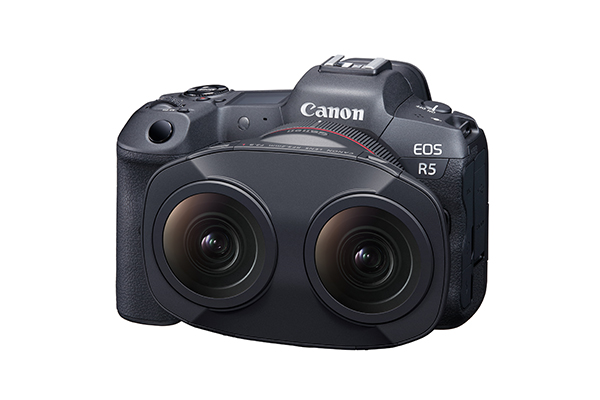
The RF-S3.9mm F3.5 STM DUAL FISHEYE, which I bought around the same time as the EOS R50 V, arrived a little later. More precisely, I went to Camera no Kitamura to pick it up, so it might be more accurate to say I brought it home. It is along my commute route to a coworking space I sometimes use, so it is easy to pick things up there.
The RF-S3.9mm F3.5 STM DUAL FISHEYE has the widest angle of view among the VR lenses that can be attached to the EOS R50 V. There are products with slightly narrower angles of view, but what I wanted to try making this time was a spatial video that opens into the field of view, so I chose this one.
The EOS R50 V is on the smaller side for an interchangeable-lens camera that also has heat dissipation measures. Because of that, when the VR lens is attached, the lower part of the body floats, and the lens looks unusually large compared with the camera.
Considering the resolution of Vision Pro, ideally I would want 8K, or at least around 6K, but the EOS R50 V shoots at 4K. The RF-S3.9mm F3.5 STM DUAL FISHEYE also has a 144-degree angle of view rather than 180 degrees, so it feels a little lacking. Still, its compactness is hard to give up, and I want to explore whether that "slightly lacking" feeling can become some kind of strength. I think it may be the minimum size for shooting side-by-side video.
I casually shot around my neighborhood and tried importing the video into Xcode, only to learn that it was not as easy as I expected. For example, Canon has announced that the camera and lens I bought support APMP (Apple Projected Media Profile) through EOS VR SYSTEM, but it seems that the current version does not yet support exporting it.
For now, I wanted to watch video shot on the actual device, so I decided to use Apple's sample project for spatial video.
However, this Rendering stereoscopic video with RealityKit project supports visionOS 26 / Xcode 26 and later, so I had to update both my Vision Pro and Xcode to 26. Since I was using visionOS 2.6, this felt like suddenly jumping more than 20 versions.
This project does not play video in a way that covers the whole field of view like Apple TV does. Still, I only wanted to check whether the video I shot actually had proper stereoscopic information, so that was fine. I imported the video I shot into Xcode.
Actually, there was another issue here. It was not enough to simply drag the video into Xcode. I had to convert it using Canon's utility. You need to use the EOS VR SYSTEM mentioned earlier, or the EOS VR Plugin for Adobe Premiere Pro. On top of that, it requires a 550-yen monthly subscription, and EOS VR SYSTEM and EOS VR Plugin for Adobe Premiere Pro are billed separately. I had forgotten to check this in advance. I did not expect the official tool to require payment.

That said, not using it was not really an option, so I subscribed and converted the video. After that, I confirmed the Xcode project could build and changed the video loading, which completed this step. However, this is not really finished. Work such as mapping it across the whole space will be a future task.